


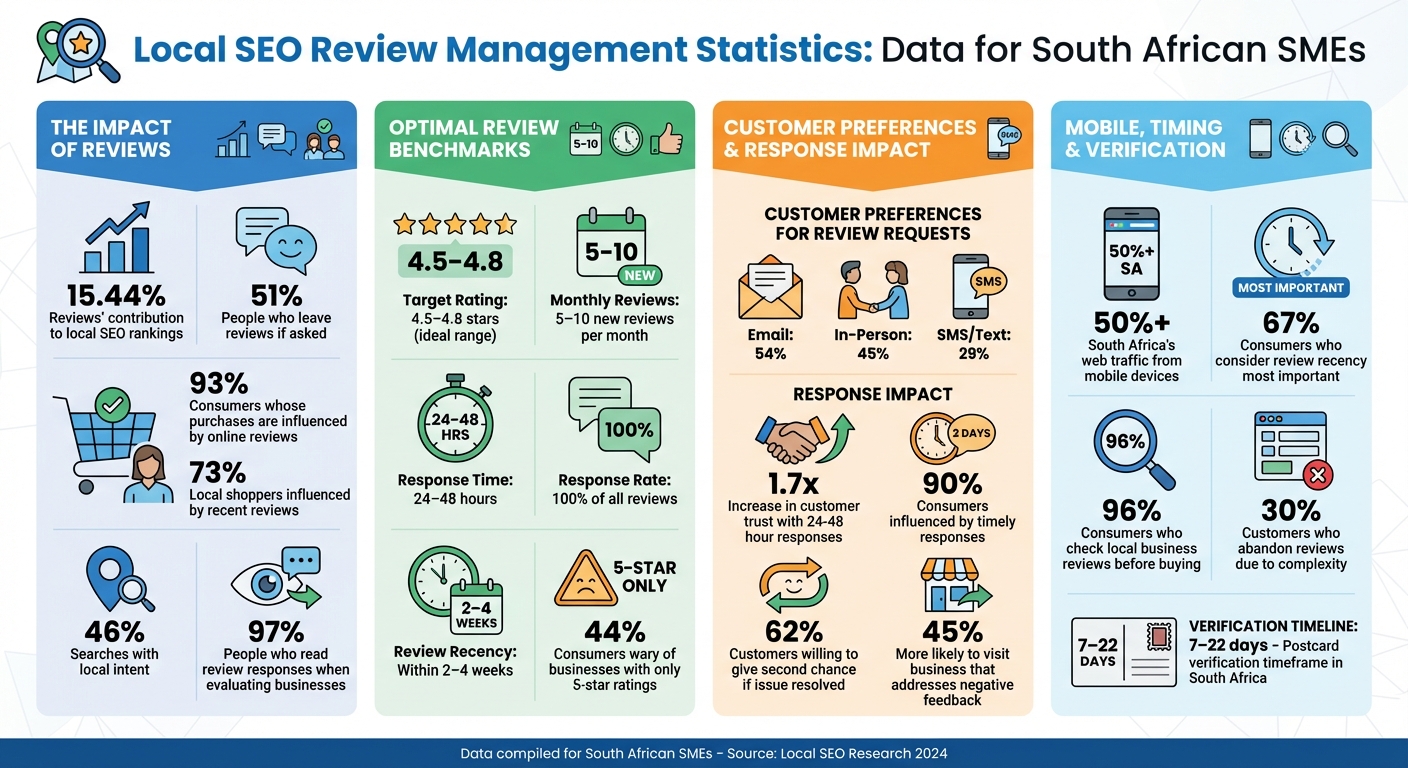
When customers search for "plumber near me" or "best restaurant in Sandton", reviews heavily influence which businesses rank higher. Reviews contribute 15.44% to local SEO rankings, making them a powerful tool for South African SMEs to boost visibility without overspending on ads. Here’s how you can use reviews to improve your local SEO:
- Claim & Optimise Your Google Business Profile (GBP): Ensure your profile is verified, accurate, and complete, with consistent business details (Name, Address, Phone) across platforms. Add high-quality photos and update your hours regularly.
- Encourage Reviews: Ask customers for feedback right after a purchase or service. Use direct links, QR codes, or follow-up emails. Over 51% of people leave reviews if asked, so timing matters.
- Respond to All Reviews: Reply professionally to both positive and negative reviews. Acknowledge positive feedback with specific details and address complaints calmly, offering solutions.
- Monitor Metrics: Track the number, recency, and diversity of reviews. Aim for a 4.5–4.8 star rating and respond within 24–48 hours to maintain trust and engagement.
- Leverage Reviews on Your Website: Use structured data (JSON-LD) to display reviews and integrate customer feedback into your content to improve rankings.
Local SEO Review Management: Key Statistics and Benchmarks for South African SMEs
Advanced Local SEO: Turn Bad Reviews Into Ranking Power
Set Up and Optimise Your Google Business Profile
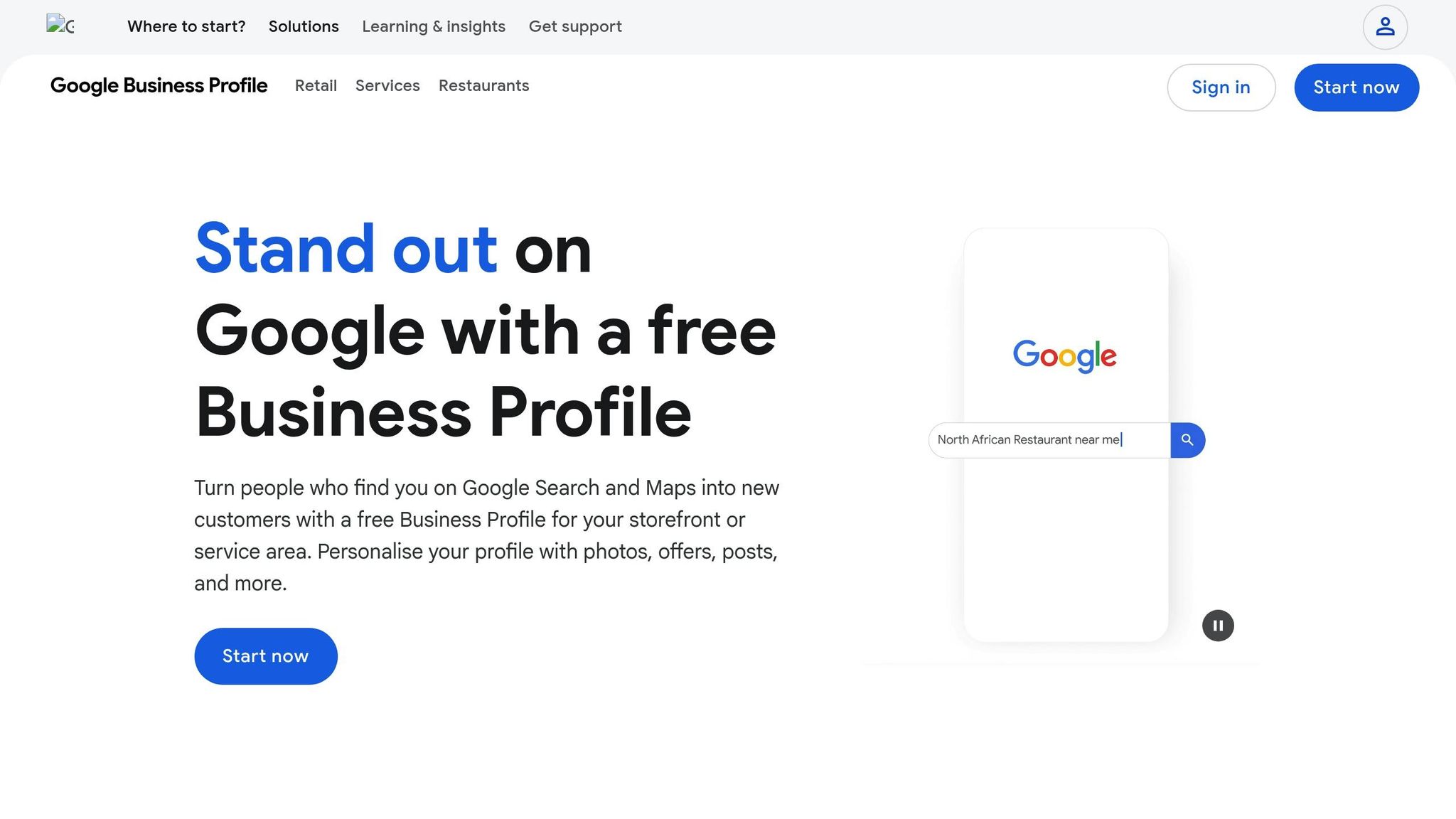
Your Google Business Profile (GBP) is a key part of your local SEO strategy. It’s what helps your business show up in the Local Pack – that map with three businesses at the top of search results. For South African small businesses, this is a golden opportunity to stand out. With over 50% of South Africa’s web traffic coming from mobile devices, many users are searching for businesses “near me” with the intent to call or visit right away.
How to Claim and Verify Your Google Business Profile
To get started, head over to google.com/business and log in with a dedicated Google account – not your personal one. Search for your business name in the Business Profile manager or on Google Maps. If your business is already listed, you’ll see an option to “Claim this business” or “Own this business?” Follow the steps provided to claim it. If there’s no listing yet, click “Add your business to Google” and provide details like your official business name, a specific primary category (e.g., “Plumber” instead of the broader “Home Services”), and your physical address.
Verification is essential. In South Africa, the most common method is postcard verification, which takes between 7 and 22 days. Other options include phone or SMS codes, email verification, or instant verification through Google Search Console if your website is already verified. You won’t have full access to your profile or be able to respond to reviews until this process is completed. Once verified, make sure all your business details are consistent across platforms.
"Verification can be done by mail, phone, email, or via Search Console." – Heideli Loubser, Copywriter
Keep Your Business Information Accurate and Consistent
After verification, it’s crucial to ensure your Name, Address, and Phone number (NAP) are identical across your GBP, website, and South African directories like Brabys, Yellow Pages, and Hotfrog. Even minor differences – like writing “Street” in one place and “St.” in another – can confuse Google’s algorithm and hurt your rankings.
"Your NAP must be 100% consistent everywhere it appears online – on your website, on your social media, and in online directories. Any variation confuses Google and can harm your ranking." – Aza Mkansi, Coolhost
Complete every field in your profile. Add a detailed business description (up to 750 characters), select relevant attributes like “Wheelchair accessible,” and list your products or services with pricing. Photos are also a must – upload at least 10 high-quality images of your storefront, interior, team, or products. Profiles with photos tend to get far more clicks and direction requests.
If you’re a service-area business, like a plumber or electrician, make sure to hide your physical address and specify the suburbs or cities you serve. This helps you rank in those areas. Don’t forget to update your hours regularly, especially for South African public holidays, to avoid frustrating potential customers.
Get More Positive Reviews from Customers
Timing is everything when it comes to getting customer reviews. The best moment to ask is right after a service or purchase, while the experience is still fresh in their minds. Doing this not only helps you gather positive feedback but also gives your local SEO rankings a boost. The truth is, most people don’t leave reviews because they simply forget. By asking promptly, you can overcome this hurdle and increase your chances of receiving feedback.
Here’s an interesting fact: 51% of customers will leave a review if you just ask. For South African businesses, using multiple channels to request reviews can make a big difference. Email is the favourite for 54% of customers, while 45% respond better to in-person requests. SMS is also a powerful tool – most text messages are read within two minutes, compared to the 90-minute average for emails. Train your staff to ask naturally when a customer is happy, using simple prompts like, "How was your experience today?"
How to Ask Customers for Reviews
Make it as easy as possible for customers to leave a review. A complicated process is a dealbreaker for many – 30% of customers abandon reviews because they find it too confusing. Always include a direct link to your Google Business Profile (GBP) review form in your messages. You can find this link in your GBP dashboard under the "Ask for reviews" section. QR codes are another great option. Print them on receipts, business cards, or display them at your counter so customers can quickly scan and leave a review before they head out.
Keep your request brief and to the point. Instead of a vague, generic ask, try something specific, like "How was Thabo’s service today?" This encourages detailed feedback and naturally includes useful keywords for your profile. Let customers know it only takes a minute to leave a review – this helps reduce procrastination. If they don’t respond to your first email, send a polite follow-up after a week or two, but avoid being pushy.
A well-crafted review request not only brings in feedback but also strengthens your connection with customers, a topic we’ll dive into next.
Build Trust Through Personal Customer Interactions
Strong relationships with your customers lead to more authentic reviews. When people feel valued, they’re more likely to share their experiences. Start by thanking them for their business, then explain how their feedback helps you improve and supports others in the community who are looking for reliable services. Reassure them that every review is read and appreciated – this shows that their opinions genuinely matter.
Avoid the unethical practice of "review gating", where only satisfied customers are asked to leave reviews. This approach can come across as dishonest and may even harm your reputation. Instead, invite all customers to share their honest feedback. If you’ve built trust through excellent service and personal interactions, positive reviews will naturally follow. Each review adds to your credibility and strengthens trust within your community.
| Method | Customer Preference |
|---|---|
| 54% | |
| In-Person | 45% |
| SMS/Text | 29% |
Respond to All Reviews Professionally
Once reviews start coming in, your next move is to respond thoughtfully and professionally. Why? Because responding to reviews not only boosts your local SEO but also builds trust with potential customers. In fact, 97% of people read review responses when evaluating businesses. Each response is a chance to show how much you value your customers and how committed you are to excellent service.
Timely responses are key. Businesses that reply within 24 to 48 hours increase customer trust by 1.7 times and influence 90% of consumers. Since 60% of reviewers expect a response within two days, being prompt helps you meet customer expectations while keeping your business profile active in Google’s rankings.
"Owner responses represent one of the greatest assets your local business has for becoming an active contributor to your online reputation, rather than a powerless bystander." – Moz
How to Reply to Positive Reviews
Responding to positive reviews is more than just a polite gesture – it’s an opportunity to boost trust and improve your local SEO. Start by thanking the reviewer by name and referencing specific details from their feedback. This makes your response feel personal and genuine, rather than robotic or generic. For example, if a customer mentions your "quick turnaround" or "friendly service", echo those phrases in your reply. This not only shows you’re paying attention but also naturally reinforces positive keywords that can help with SEO.
Instead of a generic "Thanks for the review", try something like: "Thanks, Sarah! We’re so glad you loved our fast delivery service – it’s something we take pride in."
You can also use positive reviews as a way to share updates about new products or services. Even though only 40% of customers leaving positive feedback expect a reply, responding can surprise and delight them, strengthening their loyalty.
How to Handle Negative Reviews
Negative reviews can be tough, but how you respond can make all the difference. Keep your tone calm and professional, no matter how unfair the review might feel. Remember, your reply isn’t just for the reviewer – it’s for everyone who reads it. Start with a sincere apology and take responsibility, even if the issue was a one-time mistake. Avoid arguing or sounding defensive, as this could harm your reputation with future customers.
The goal is to take the conversation offline quickly. Provide direct contact details, like an email or phone number, so you can resolve the issue privately. Offer a clear solution, such as a refund or a chance to redo the service, to show your commitment to making things right. This approach works: 62% of customers are willing to give a business a second chance if their issue is resolved thoughtfully, and 45% are more likely to visit a business that addresses negative feedback.
| Response Type | Primary Goal | Key Element | Call to Action |
|---|---|---|---|
| Positive Review | Build loyalty and highlight strengths | Gratitude with specific details | Invite them back or share updates |
| Negative Review | Manage damage and retain customers | Sincere apology and clear solution | Move the conversation offline |
sbb-itb-6f8605a
Track Review Metrics and Local SEO Performance
Once you’ve started managing your reviews, the next step is to monitor key metrics to understand how they influence your local SEO efforts. By keeping track of these metrics, you can identify which strategies are boosting your rankings and refine your approach. The right tools and data can help you measure how your reviews impact your SEO performance.
Tools for Monitoring Reviews and Rankings
To simplify review tracking and local SEO monitoring, tools like BrightLocal are incredibly useful. BrightLocal allows you to gather feedback from platforms such as Google, Facebook, and Yelp while offering features like reputation management, local search grid tracking, and Google Business Profile audits. Plans start at R730 per month, making it a valuable option for businesses of all sizes.
"If you want to save time and save money, then BrightLocal must be part of your local SEO toolkit." – Susan Hallam MBE, Managing Director, Hallam Internet
Another excellent option is Semrush Local, which uses AI to generate responses to reviews and analyse competitor review profiles. This tool can help you uncover market opportunities and strengthen your local SEO strategy. For a more budget-friendly alternative, Localo offers a 14-day free trial and includes features like an AI review responder and local rank tracker. It’s highly rated, with a 4.9/5 score on G2. Smaller businesses might also consider rankingCoach, which offers a free version for basic monitoring needs.
Additionally, setting up daily email alerts for low-rated reviews (three stars or fewer) ensures you can respond promptly, helping to maintain your online reputation. With these tools at your disposal, you can start tracking the metrics that matter most for local SEO.
Essential Review Metrics
Google’s local search algorithm relies heavily on three key review signals: volume (the total number of reviews), freshness (how recent the reviews are), and diversity (reviews spread across multiple platforms). To build trust and improve your rankings, aim for the following:
- A total average rating between 4.5 and 4.8 stars. This range is ideal for establishing credibility without raising suspicion, as 44% of consumers are wary of businesses with only five-star ratings.
- Consistent activity, with 5–10 new reviews per month, which signals to Google that your business is actively engaging with customers.
- Recent reviews, as 67% of consumers consider review recency the most important factor when choosing a local business.
Equally important are your response rate and time. Around 60% of consumers expect a reply to their reviews within two days, so aim to respond to all reviews within 24 to 48 hours. Monitoring review keywords, such as "best gluten-free pizza" or "quick turnaround", can also enhance your SEO, as Google uses these phrases to create local justifications in search results. Lastly, diversify your review collection across multiple platforms – not just Google – to strengthen your overall online presence.
These metrics play a direct role in improving your visibility in local search results, making effective review management a crucial strategy for South African SMEs.
| Metric | Target Benchmark | Impact on Local SEO |
|---|---|---|
| Average Rating | 4.5 to 4.8 Stars | High (Trust & Click-Through) |
| Review Velocity | 5–10 New Reviews/Month | High (Ranking Signal) |
| Response Time | Under 48 Hours | Medium (Engagement) |
| Response Rate | 100% of all reviews | Medium (Trust) |
| Review Recency | Within the last 2–4 weeks | High (Conversion) |
Add Reviews to Your Website and Content
Featuring reviews on your website and weaving them into your local content strategy can significantly improve local SEO. By combining review metrics with smart display tactics, you can enhance your online presence and build trust with potential customers.
How to Display Reviews on Your Website
Using JSON-LD review schema is a great way to showcase reviews on your website. This structured data helps Google better understand your reviews and could even result in star ratings showing up as rich snippets in search results. But there’s a catch – Google requires these reviews to be collected directly from users on your site, not pulled from third-party platforms.
"Ratings must be sourced directly from users. Don’t rely on human editors to create, curate or compile ratings information for local businesses… Sites must collect ratings information directly from users and not from other sites."
– Google Search Console Course
If your business operates across multiple locations, consider creating separate review sections for each location’s landing page. This approach not only improves user experience but also strengthens your local SEO for each location.
Mike Blumenthal from GetFiveStars suggests publishing all legitimate feedback to build credibility. He notes that displaying all reviews generally results in less than a half-point drop in star ratings. For negative reviews, he recommends holding them for 7–10 days to try to resolve issues privately before making them public.
Instead of limiting reviews to a single testimonials page, sprinkle them across your site. Add relevant reviews to service pages, product pages, and location-specific landing pages. Tools like Smash Balloon, Wiremo, or Broadly can help automate this process without slowing down your site.
Once you’ve displayed reviews effectively, take it a step further by incorporating them into your content strategy.
Use Reviews in Local Content
Don’t just display reviews – use them to enhance your local content. Customer feedback is a goldmine for natural language and local SEO keywords. For example, phrases like "best gluten-free pizza in Cape Town" or "quick turnaround in Sandton" can be seamlessly integrated into your website copy, blog posts, or even social media content. Google often highlights these snippets in the Local Pack when they align with search queries.
You can also repurpose reviews into visual content for your Google Business Profile, social media updates, or FAQ sections. Make sure your NAP (Name, Address, Phone) details are consistent across all platforms to strengthen your local SEO signals.
Since most local searches happen on mobile devices, ensure your review displays are mobile-friendly. Use large, easy-to-read fonts so that the 96% of consumers who check local business reviews before buying can quickly access and trust your feedback.
Conclusion
Managing reviews isn’t just about collecting star ratings – it plays a key role in improving your Map Pack ranking and attracting more customers. By sticking to the strategies outlined in this guide, you can strengthen the three key elements of local SEO: proximity, relevance, and prominence. Reviews act as signals to Google, showing that your business is active, reliable, and worth ranking.
"Effective review management is a local SEO superpower. You don’t need a big budget, just a smart, consistent system." – Octavian Ciorici
With 93% of consumers admitting that online reviews influence their purchases, and 73% of local shoppers being particularly swayed by recent reviews, the impact of reviews is undeniable. In a world where 46% of searches are focused on local intent, keeping a steady flow of 5–10 new reviews each month and replying to them within 24–48 hours is crucial.
The numbers don’t lie – strategic review management delivers results.
By consistently applying these techniques – optimising your profile, gathering fresh reviews, and responding promptly – you’ll not only boost your local SEO but also expand your customer base. Take time to refine your Google Business Profile, actively engage with reviews, and build trust within your community. Regularly track your review metrics and showcase standout reviews on your website and social media platforms.
Thriving businesses see review management as an ongoing conversation with their community. Stay committed to these practices, and over time, you’ll notice increased visibility and a growing customer base.
Need expert advice? Reach out to Aion Marketing for tailored tips on improving your local SEO through effective review management.
FAQs
How can I get more customers to leave reviews for my business?
Encouraging customers to share their feedback is a great way to boost your local SEO rankings and earn the trust of South African shoppers. Google pays close attention to the number, frequency, and quality of reviews when determining local search rankings. This means that a consistent stream of genuine reviews can enhance your visibility. Plus, responding to every review – whether it’s glowing or critical – shows that you’re committed to customer satisfaction, which builds trust and credibility.
To increase reviews, reach out to customers within 24–48 hours of their purchase or service while their experience is still top of mind. A friendly SMS or email with a direct link to your Google Business Profile makes it easy for them to leave feedback. Alternatively, you can use QR codes on receipts or in-store displays to simplify the process even further. Offering a small incentive, like a R50 voucher or entry into a lucky draw, can motivate customers to leave reviews – just ensure it’s not conditional on them giving a positive rating. Highlighting existing reviews in your physical store or on your website can also encourage others to share their thoughts.
By following these straightforward steps, specifically tailored for South African businesses, you can grow your reviews steadily and improve your local SEO results.
How should I respond to negative reviews effectively?
When dealing with negative reviews, timing is everything – try to respond within 24 hours. Start by acknowledging the reviewer’s concerns with a calm and professional tone. Avoid getting defensive or reacting emotionally. Instead, show understanding, thank them for their feedback, and focus on finding a solution.
If your business made a mistake, offer a genuine apology and explain what happened without shifting blame. Clearly outline the steps you’re taking to fix the issue. When necessary, suggest continuing the conversation privately – whether over the phone or via email – to resolve the matter more effectively.
Keep in mind, your responses are visible to the public and can influence how potential customers view your business. By addressing negative reviews thoughtfully, you not only resolve problems but also highlight your dedication to great service. This approach can positively impact your local SEO and build a stronger reputation within South Africa.
How do customer reviews affect local SEO rankings?
Customer reviews are a powerful factor in boosting your local SEO rankings. Google’s local search algorithm takes into account the number, quality, recency, and responses from business owners when deciding which businesses to prioritise in local search results. A consistent stream of genuine, positive reviews signals to Google that your business is reliable and relevant to your community, which can help improve your visibility in local searches.
Beyond SEO, reviews serve as social proof, giving potential customers more confidence in choosing your business over competitors. For South African SMEs, every glowing five-star review not only strengthens your reputation but also adds fresh, keyword-rich content that can help you rank better for local search terms. If managing reviews feels overwhelming, experts like Aion Marketing can help streamline the process, ensuring you make the most of this opportunity to attract more local customers.


