


Want to streamline your sales and marketing efforts? Integrating your CRM and marketing tools is the solution. This ensures your teams work with accurate, up-to-date data, improves lead management, and boosts campaign performance.
Here’s what you need to know:
- What it is: Integration links your CRM and marketing platforms for seamless data sharing.
- Why it matters: South African SMEs can cut manual tasks by 50%, shorten sales cycles by 42%, and increase close rates by 28%.
- Steps to take:
- Review your tools for compatibility and features.
- Set clear goals, like improving lead conversion rates or reducing sales cycle times.
- Clean and standardise your data to avoid errors.
- Map data fields, test workflows, and train your team.
- Monitor dashboards, review performance, and refine processes.
Key takeaway: Integration isn’t just about connecting systems – it’s about improving efficiency and driving revenue. For South African SMEs, this can mean an average ROI of R5.44 for every rand spent.
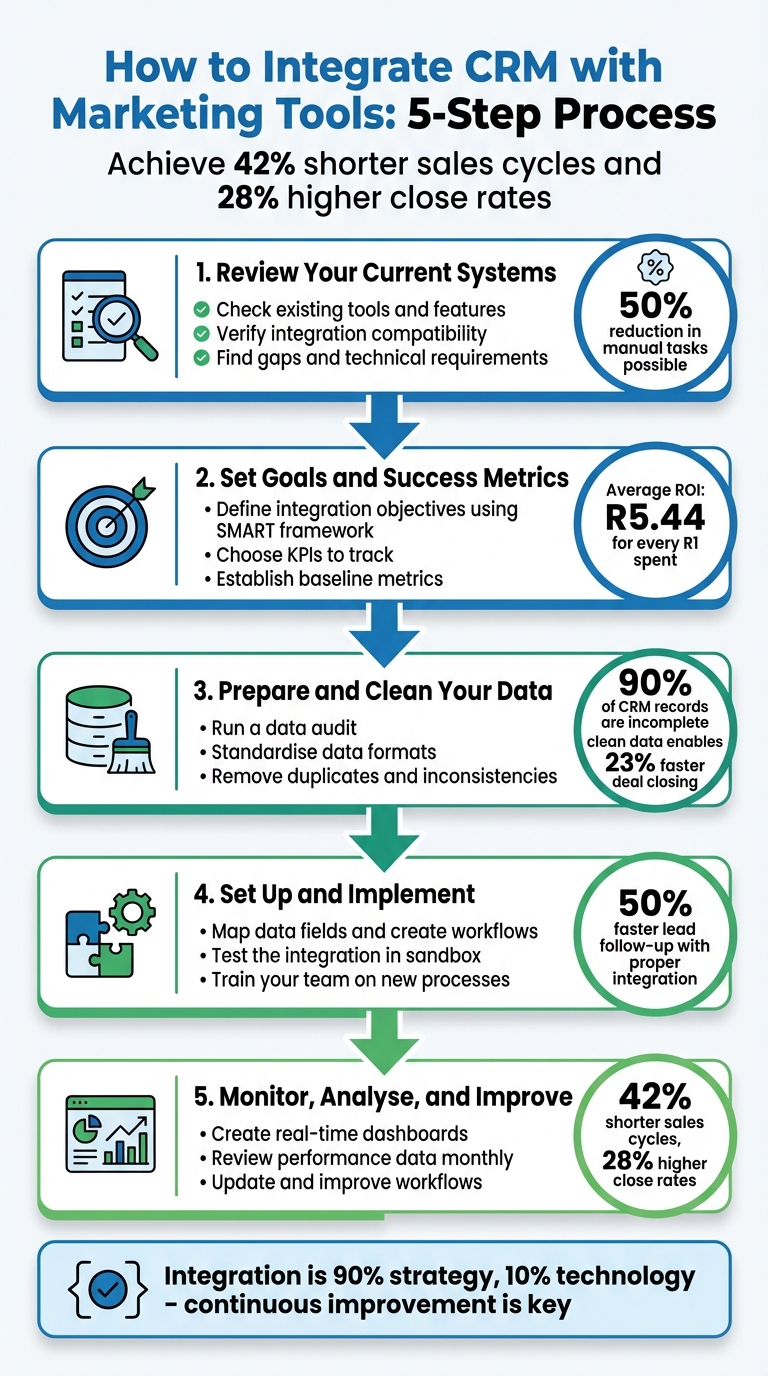
5-Step CRM and Marketing Tools Integration Process for SMEs
SuiteCRM & Mautic Integration Tutorial | How to Sync Your CRM & Marketing Automation
sbb-itb-6f8605a
Step 1: Review Your Current Systems
Start by taking stock of your CRM and marketing platforms. Document details like the versions you’re using, subscription levels, and user access permissions. This will give you a clear picture of your current setup and help avoid potential issues down the line.
Check Your Existing Tools and Features
Dive into your CRM and marketing platform to list their main features. For example, does your CRM track deal stages and customer purchase history? Can your marketing platform assign lead scores based on email engagement or website activity? Make a note of each system’s strengths and limitations.
Pay close attention to how your data syncs. Does it allow for bidirectional sync? This is crucial to ensure updates flow both ways. For instance, if a sales rep updates a phone number in the CRM, that change should automatically reflect in your marketing tool. Some systems only allow one-way data flow, like marketing data syncing into the CRM but not the other way around. Bidirectional sync ensures your teams always have accurate, up-to-date information.
Verify Integration Compatibility
Check if your systems offer native integrations – these are built-in connectors provided by the software vendor. Look in your CRM’s app marketplace (such as the HubSpot App Marketplace or Salesforce AppExchange) to find verified integrations with your marketing platform. Native integrations are often the most straightforward and reliable option.
If no native integration exists, consider using third-party middleware like Zapier, Make, Workato, or Tray.io. These tools act as bridges between your systems but may come with limitations, such as slower sync speeds or batch processing instead of real-time updates. For example, Instructure, a learning management provider, used an iPaaS solution to link Marketo, Salesforce, Cvent, and ON24. This setup allowed them to capture webinar engagement data directly in Salesforce and speed up lead follow-ups by 50%.
Find Gaps and Technical Requirements
Identify any missing features or technical needs. Do your systems support API access? APIs are essential for syncing custom fields or managing large data volumes. Check for webhooks too – these real-time notifications are key for immediate actions, like routing leads when a prospect shows high intent.
Look for potential issues, like whether your marketing tool can track UTM parameters. If not, consider adding hidden fields to capture this data before integrating. Also, ensure both systems use consistent data formats. For instance, differences like "USA" versus "United States" in picklist values can lead to duplicate records or sync errors.
"A successful CRM and marketing automation integration is 90% strategy and only 10% technology." – MarTech Do
Finally, make sure your admin accounts have the necessary read/write permissions on both platforms. Without proper access, your integration won’t be able to update records, effectively rendering it useless. Once you’ve identified these gaps and requirements, you’re ready to move on to defining your integration goals.
Step 2: Set Goals and Success Metrics
After reviewing your current systems, the next step is to set clear goals for your integration. This isn’t just about connecting systems – it’s about achieving meaningful business outcomes. Without well-defined objectives, the integration risks becoming a technical task with little real-world value.
Define Your Integration Objectives
Start by pinpointing specific challenges your business is facing. Are you looking to improve lead conversion rates, cut down on customer acquisition costs, or speed up your sales cycle? For example, Samuel Kunene from Midlands Mediation Counsellors shared that integrating their CRM system transformed the way they managed client communication and cases, leading to noticeable business growth.
To make your goals actionable, use the SMART framework: Specific, Measurable, Achievable, Relevant, and Time-bound. Avoid vague ambitions like "improve sales" and instead aim for something more concrete, such as "boost lead-to-opportunity conversion by 20% within six months." Other practical objectives might include automating the transition from Marketing Qualified Leads (MQL) to Sales Qualified Leads (SQL) to avoid missed opportunities, or cutting manual data entry by half, freeing up your team for more strategic initiatives.
Choose Key Performance Indicators (KPIs)
Once you’ve set your objectives, you’ll need to track progress with the right metrics. Start by establishing a baseline – this will help you measure the return on investment (ROI) of your integration efforts. For instance, if your current lead response time is 45 minutes, see if integration can bring it down to under five minutes for high-priority leads.
Your KPIs should cover both technical performance and business results. For technical health, track metrics like data sync error rates to ensure systems are communicating seamlessly. On the business side, monitor lead-to-opportunity conversion rates and sales cycle length to gauge the impact on revenue. Research shows that companies with integrated systems experience 42% shorter sales cycles and 28% higher close rates. For South African SMEs, reducing manual tasks is especially critical, as it allows scaling without the need for additional hires.
| KPI Category | Metric to Track | What It Measures |
|---|---|---|
| Conversion | Lead-to-Opportunity Rate | Quality of leads and alignment with sales |
| Efficiency | Lead Response Time | Speed of follow-up on high-intent leads |
| Financial | Customer Acquisition Cost | Efficiency of marketing spend |
| Retention | Customer Lifetime Value | Long-term profitability and loyalty |
| Technical | Data Sync Error Rate | System health and data accuracy |
Step 3: Prepare and Clean Your Data
Getting your data in order is a crucial step for successful integration. Poor data quality can wreak havoc on your systems. Consider this: nearly 90% of CRM contact records are incomplete, 20% are unusable, and B2B data deteriorates by 30% every year. For South African SMEs, this issue translates to an average loss of R12.9 million annually and up to 40% of marketing budgets wasted on incorrect or non-existent contacts.
Clean, high-quality data is the foundation for an efficient integration process.
Run a Data Audit
To meet your integration goals, your data must be accurate and reliable. Start by backing up your CRM data – this ensures you have a safety net in case of accidental changes or deletions. Once backed up, assess your data using these five dimensions: completeness, accuracy, consistency, duplicates, and timeliness.
Check critical fields like email addresses, phone numbers, and company names for missing or incomplete information. Look out for inconsistencies that could create duplicates, such as "USA" versus "United States" or "Inc." versus "Incorporated". Use your CRM’s reporting tools to filter by "last activity date" and flag any records that have been inactive for over 24 months as candidates for archiving. To tackle duplicates, apply both exact matching and fuzzy matching techniques – this helps you spot variations like "Bob" versus "Robert".
Set measurable goals for your data quality: aim for a duplicate rate below 2%, ensure 95% completion of key fields, and achieve an email validity rate of 98%. Why does this matter? Verified data enables sales teams to close deals 23% faster.
Standardise Data Formats
Once your audit is done, the next step is to standardise your data. Consistency is key to ensuring smooth integration. Create clear formatting rules for every field.
For South African organisations, standardise phone numbers using the E.164 international format. For example, write +27 11 123 4567 instead of (011) 123-4567. Use proper case for names (e.g., "Jane Smith" rather than "JANE SMITH") and ensure all email addresses are in lowercase (e.g., jane.smith@company.co.za). Replace free-text fields with dropdown menus (picklists) for categories like province, industry, and lead source to reduce inconsistencies.
Finally, establish a "source of truth" for your data. Typically, your CRM should manage firmographic details like company size and location, while behavioural data – such as email clicks and website visits – should be tracked by your marketing tools.
| Field Type | Standardisation Rule | Example |
|---|---|---|
| First/Last Name | Proper Case | Jane Smith |
| Phone Number | E.164 International | +27 11 123 4567 |
| Email Address | All Lowercase | jane.smith@company.co.za |
| Province | Consistent Abbreviation | GP (for Gauteng) |
| Job Title | Standardised Acronyms | CEO (not Chief Executive Officer) |
Step 4: Set Up and Implement the Integration
Now that your data is clean and standardised, it’s time to connect your systems. This step takes all your preparation and turns it into a functional integration. While the technical setup requires precision, the results can be well worth it – companies with integrated systems often experience 42% shorter sales cycles and 28% higher close rates.
Map Data Fields and Create Workflows
Start by defining which system owns what data. For example, your CRM should manage firmographic and sales data, while marketing tools handle engagement metrics. Use the standardised formats you established earlier to ensure accurate mapping. Match fields like "First Name" to "First Name" and "Email" to "Email". For custom fields, such as UTM parameters, map these to custom lead fields in your CRM to track campaign performance effectively.
Decide on your sync direction:
- Unidirectional sync: Data flows one way, protecting master records in the source system.
- Bidirectional sync: Data updates in both systems, ideal for fields like name or email.
For South African SMEs running Google Ads or Meta campaigns through tools like Aion Marketing, bidirectional sync ensures marketing data flows into the CRM while sales updates provide feedback for campaign adjustments.
Set up inclusion lists and automate the MQL-to-SQL handoff. For instance, only push leads with a score above 100 to sales, ensuring your team focuses on the most promising prospects. Once a lead qualifies, the system can reassign ownership, create follow-up tasks, and notify the sales team automatically.
Glassdoor provides a great example of this in action. By integrating their marketing platform, CRM, and attribution tools, they gained a complete view of their customer journey. This allowed them to refine lead scoring, increasing SQLs by 50% and lowering their cost-per-MQL by 30%.
| Sync Type | Direction | Best Use Case |
|---|---|---|
| Unidirectional | One-way | Ideal for protecting master data while syncing engagement data to the CRM only. |
| Bidirectional | Two-way | Best for keeping both systems updated with fields like name or email. |
Test the Integration
Before going live, test in a sandbox environment. Use a manageable dataset – around 500 contacts should do the trick. Create a User Acceptance Testing (UAT) checklist that covers practical scenarios, such as form submissions, field updates, status changes, and compliance adjustments.
Take a page from Instructure, a learning management provider. They integrated their marketing platform, CRM, and webinar tools to capture webinar engagement directly in their CRM. This setup triggered real-time sales alerts, speeding up lead follow-up by 50%.
During testing, keep a close eye on sync error logs. Common issues include missing customer information (fix this by ensuring mandatory fields like email or phone are included) and permission errors (resolve these by enabling partner access). If something fails, check that at least one unique identifier, like a hashed email or Lead ID, is mapped correctly. Test custom fields thoroughly by adding records with multiple attributes to confirm that every field works as expected.
Once testing is successful, shift your focus to preparing your team for the new workflows.
Train Your Team on New Processes
Training is essential to ensure your team uses the integration effectively. Focus on what’s in it for them (WIIFM). Sales teams will appreciate having warmer leads with detailed context, such as which emails a prospect opened, which pages they visited, and which content they downloaded. Marketing teams gain clear visibility into how campaign spend translates into closed deals.
Run hands-on workshops where team members practise tasks like creating leads, updating contact details, or moving deals through various stages. These sessions can help identify workflow gaps that might not be obvious during theoretical training. Document your processes clearly, explaining when to use specific fields, how to interpret lead scores, and what triggers automated handoffs.
To ensure ongoing success, appoint integration champions in both sales and marketing. These experienced team members can act as go-to resources for questions and troubleshooting. Remember, poor user adoption is one of the main reasons CRM implementations fail, with failure rates ranging from 20% to 70%. Schedule follow-up sessions at 30 and 90 days to address any issues and refine workflows based on real-world feedback. Proper training and support will help you leverage the integration to shorten sales cycles and boost conversion rates, as highlighted earlier.
Step 5: Monitor, Analyse, and Improve
Once your integration is live and your team is up to speed, the real work begins – continuous improvement. Integration isn’t a “set it and forget it” task. As one expert explains:
"Integration completion isn’t the finish line. Now you configure CRM and marketing automation integration to work the way your business operates." – InfluenceFlow
For South African SMEs, this ongoing effort can mean the difference between achieving an average ROI of R5.44 for every rand spent and ending up with an underused system.
Create Real-Time Dashboards
Dashboards are your window into the health of your funnel. With your integration in place, you now have a single source of truth – a unified database combining marketing, sales, and customer interaction data. Use this to track leads as they progress through stages like Raw Lead, Marketing Qualified Lead (MQL), Sales Opportunity, and finally, Customer.
Set your systems to sync with your CRM and marketing platform every five minutes, ensuring the dashboards display up-to-date information. Be mindful of API limits, as exceeding them could freeze syncs and exports for the rest of the day. Focus on tracking metrics such as lead conversion rates, sales cycle lengths, marketing-sourced revenue, and sync error rates. These real-time insights provide the foundation for monthly performance reviews.
Review Performance Data
Monthly reviews of your dashboard data can uncover trends and opportunities. Pinpoint which campaigns drive the highest Lead-to-Opportunity conversions, identify where leads stall, and determine which ideal customer profile (ICP) segments are most responsive. If your sales cycles are dragging or conversion rates are flat, it’s time to tweak your lead scoring system or adjust marketing strategies.
Quarterly, dive deeper into sync error logs and data reports to ensure your data remains accurate. With 10% to 25% of B2B marketing databases containing critical errors, regular audits are crucial. Experiment with elements like email subject lines, timing, and calls-to-action, then use closed-loop reporting to directly link these changes to pipeline results. This approach helps SMEs allocate limited marketing budgets more effectively.
Update and Improve Workflows
As you refine your strategies, revisit your workflows to ensure they align with the insights gained from your dashboards. If leads consistently stall at a particular stage, adjust your nurture sequences or qualification criteria. For high-intent activities – like visits to pricing pages or downloads of product comparisons – set up triggers to notify sales reps immediately. Review your inclusion lists regularly to avoid clogging the pipeline with unqualified leads, allowing your team to focus on the most promising prospects.
Perform a comprehensive audit of your integration settings and data mapping annually, with quarterly check-ins in between. As your business grows and evolves, your workflows will need to adapt. As one expert puts it:
"A successful CRM and marketing automation integration is 90% strategy and only 10% technology." – MarTech Do
The technology forms the base, but it’s the ongoing fine-tuning that leads to results like 42% shorter sales cycles and 28% higher close rates.
Conclusion
Key Takeaways
Integrating your CRM and marketing tools can transform how your business operates, but it requires a structured approach. Start by auditing your data – remove duplicates and standardise formats to ensure a clean foundation. Define clear goals, like improving lead nurturing or reducing sales cycle times. Carefully map your data fields and decide which system manages specific types of information – for instance, your CRM might handle firmographic data, while your marketing tool tracks customer engagement. Testing with a small dataset can help avoid costly errors, and ongoing monitoring ensures your system continues to deliver value.
The benefits of integration are clear: faster sales cycles, better conversion rates, and improved team alignment. The real power lies in how you use the system – automating follow-ups, aligning sales and marketing strategies, and refining workflows based on performance data. Every step, from initial data audits to continuous monitoring, strengthens the impact of a well-integrated system.
Practical Steps for South African SMEs
For South African SMEs, the journey starts with identifying gaps in your current setup. Are your sales teams receiving leads without context? Is your marketing team struggling to prove which campaigns drive revenue? These are signs that integration could make an immediate difference. Set measurable goals, like reducing time-to-close by 20% or increasing revenue from marketing by 30%, so you can track the impact of your efforts.
If the technical aspects feel daunting or you’re unsure which tools fit your budget, seek help from professionals familiar with the South African market. Choose partners who understand POPIA compliance and offer local support to address any challenges. Keep in mind that integration projects typically take two to six months, so plan ahead and ensure both your sales and marketing teams are on board from the start.
Treat integration as an ongoing process rather than a one-off task. Regularly clean your data, review dashboards monthly, and tweak workflows as you learn what works best for your customers. With automation freeing up about 20% of your sales team’s time, you can focus more on what truly matters – building relationships and closing deals, which is where South African SMEs excel.
For tailored support, consider working with Aion Marketing (https://aionmarketing.co.za), a local expert in helping South African businesses integrate CRM and marketing tools effectively.
FAQs
Which data should be the “source of truth” in my CRM vs marketing tool?
The CRM acts as the central hub for essential customer information, such as contact details, purchase history, and communication logs. Marketing tools rely on this data to create targeted campaigns and segment audiences effectively. It’s crucial to have seamless integration to keep the data synchronised and accurate, ensuring consistency across all platforms.
How do I prevent duplicates and sync errors after integrating?
To keep your CRM and marketing tools working smoothly together, proper data management is essential. Start by establishing deduplication rules to prevent duplicate entries. Then, ensure that you’re mapping data fields correctly so information flows seamlessly between systems. Regularly clean and update your records to avoid outdated or incorrect data clogging up the pipeline.
Make a habit of monitoring sync operations closely. This helps you catch and fix any issues early on. Additionally, ongoing deduplication efforts will help maintain consistent and reliable data across all platforms.
How can I measure ROI from CRM and marketing tool integration?
To gauge ROI, focus on the revenue impact and key performance indicators (KPIs). These could include metrics like campaign performance, customer engagement, and operational efficiency.
Using tools like CRM dashboards can simplify the process. They allow you to calculate returns and evaluate outcomes such as sales growth or the effectiveness of workflow automation. The goal is to turn raw data into actionable insights that help you assess how well the integration is working.


