


Competitor audiences are people who engage with your competitors’ social media accounts, showing interest in similar products or services to yours. Targeting these users can save time and money while increasing your chances of reaching potential customers who are more likely to convert. For South African businesses, this method is especially effective, given the large number of active users on platforms like Facebook (26.7 million) and LinkedIn (15 million).
Here’s how to start:
- Understand Your Audience: Analyse your current audience’s demographics, behaviours, and psychographics using tools like Meta Business Suite or LinkedIn Insights.
- Identify Competitors: Pinpoint 3–5 direct and indirect competitors using search tools and platforms like Facebook Pages or Google Ads Keyword Planner.
- Track Competitor Activity: Use tools like Meta Ad Library to monitor their ads, content strategies, and engagement patterns.
- Analyse Competitor Audiences: Study their followers’ demographics and behaviours using Meta Audience Insights or LinkedIn Campaign Manager.
- Create Targeted Audiences: Use interest-based targeting and lookalike audiences in Meta Ads Manager to reach users similar to your competitors’ followers.
- Test and Refine: Run small campaigns, track performance metrics, and adjust targeting based on results.
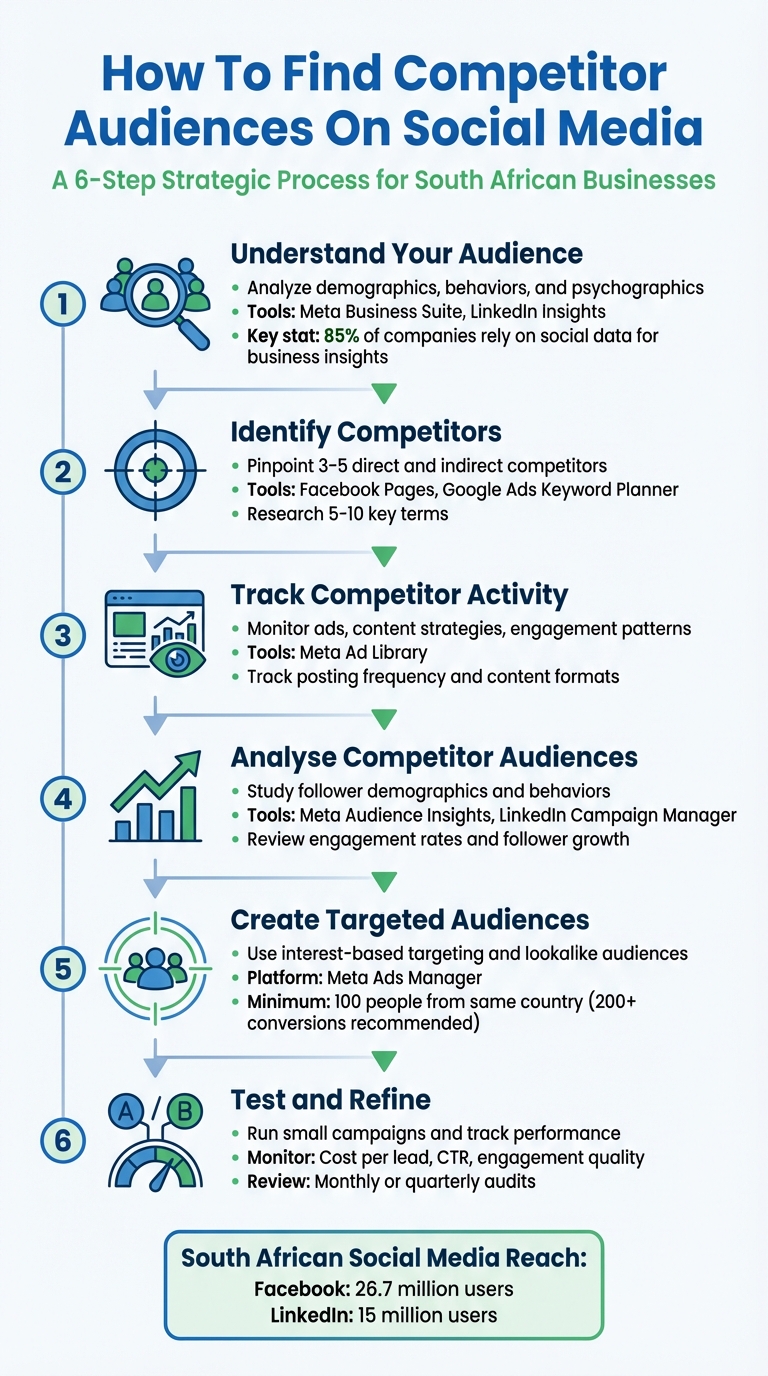
6-Step Process to Find and Target Competitor Audiences on Social Media
How To Find Competitor’s Target Audience On Facebook Ads | Step by Step
Understand Your Own Audience First
Before diving into competitor analysis, it’s crucial to define who your audience is. Did you know that 85% of companies rely on social data as a primary source for business insights?. This step ensures you’re not wasting ad spend on the wrong audience segments.
In South Africa, businesses often discover that their most engaged audience differs from their initial assumptions. Kseniia Volodina, a content marketer, puts it perfectly:
"Knowing my audience – their habits, interests, profiles, and motivations – helps me create messages that cut through the noise."
Map Your Audience Demographics and Behaviours
Start by gathering key demographic details like age, gender, location (think Gauteng, Cape Town, or KwaZulu-Natal), language preferences, education levels, and job roles. Use tools like Meta Business Suite for Facebook and Instagram or LinkedIn Company Page Insights to ensure the data is accurate and actionable.
But demographics only tell part of the story. To really understand your audience, you need to explore their psychographics. This includes their values, interests, lifestyle choices, and pain points. Keep an eye on comments, messages, and survey responses to identify recurring challenges your audience faces. Look at behavioural patterns too – what type of content gets saved versus shared? When is engagement at its peak? Are they primarily using mobile devices or desktops?.
Each platform reveals different audience behaviours. For instance:
- Facebook: The 25–34 age group makes up 31.1% of users, and content here often has a community-focused vibe.
- Instagram: Favouring a younger crowd (18–29), this platform thrives on visual storytelling with Reels and Stories.
- LinkedIn: For B2B brands, metrics like "Follower Seniority" (entry-level vs VP) and "Follower Function" (marketing vs sales) are key to understanding your professional audience.
When brands target the right audience segments, they often see engagement rates increase 2–3 times. This level of detail helps you build a clear audience profile, which will later guide your analysis of competitors’ strategies.
Record Your Current Performance Metrics
To track your progress, document your current metrics in a centralised spreadsheet using tools like Google Sheets or Excel. Include figures like engagement rates, reach, impressions, follower growth, and cost per result in rand (R). These numbers will act as benchmarks when you start comparing your performance to competitors.
Senior Social Media Manager Mya Shell offers some insight:
"What data and metrics are most important will vary based on what the main goals of the page are. If the page is trying to gain more brand awareness, then the main metric to know is reach."
Don’t stop at numbers – qualitative insights are equally valuable. Track recurring complaints, sentiment trends (positive, neutral, or negative), and frequently asked questions. Calculate your average engagement rate, figure out which content formats work best (video or carousel?), and pinpoint your ideal posting times. Use Google Analytics to measure how much of your website traffic comes from social media. Schedule regular reviews – monthly or quarterly – to keep your data fresh and your strategy informed.
With a solid understanding of your audience and performance metrics, you’ll have a strong foundation for analysing competitor strategies effectively.
Find and Select Your Competitors
After understanding your audience, the next logical step is pinpointing the competitors worth monitoring. Narrow your focus to 3–5 key competitors.
Start by distinguishing between direct competitors and indirect competitors. Direct competitors are those offering similar products or services at similar price points, making them your closest rivals in the South African market. Indirect competitors, on the other hand, may sell different products but address the same customer needs or target a similar audience. As strategist Kenichi Ohmae aptly states:
"Without competitors, there would be no need for strategy."
Identify Direct and Indirect Competitors
To identify competitors, research 5–10 key terms using tools like Google Ads Keyword Planner. Search these terms on Google and social platforms to see which brands consistently appear. Brands that dominate search results or show up in the "Pages" sections are likely your primary competitors.
You can also use tools like Facebook Audience Insights or Twitter Analytics to discover which brands your followers engage with. This helps uncover audience overlap, a crucial aspect of competitor analysis.
For a clearer picture, consider categorising competitors using a "Growth Quadrant" framework:
- Leaders: Large audiences and high growth.
- Game Changers: Emerging brands with growth potential.
- Niche Players: Small, specialised audiences.
- Established Players: Well-known brands with steady performance.
Once you’ve identified your competitors, dive deeper into their social media activity to understand how they connect with their audience.
Check Competitor Activity on Social Media
Look for brands that post consistently, generate strong engagement, and run active paid campaigns. The Meta Ad Library is a great resource for identifying competitors’ Facebook and Instagram ads. This tool reveals their messaging, creative strategies, and promotional tactics.
Pay attention to details like bios, cover photos, and call-to-action links to get a sense of their brand voice and lead generation strategies. Analyse their posting frequency, content formats (videos, carousels, static images), and whether their messaging leans more towards education, promotion, or entertainment.
Pinterest marketing expert Meagan Williamson has this advice:
"When your competitors have impressive metrics, it’s essential to understand what they are doing well to build a better social media strategy."
Build a Competitor Tracking Sheet
Organise your findings in a spreadsheet that includes each competitor’s name, website, social handles, follower counts, posting frequency, engagement rates, and content themes. Dedicate a section to ad activity, using tools like the Meta Ad Library or BigSpy for monitoring.
Track both quantitative metrics like follower growth and engagement rates, as well as qualitative insights such as brand voice (casual or formal), visual style, and content purpose. Don’t forget to include your own brand’s metrics for direct comparison.
Regularly review and update your tracking sheet. Facebook’s "Pages to Watch" feature is a handy tool for monitoring competitor growth weekly, all within the platform. By staying on top of these metrics, you can quickly adapt to shifts in competitor strategies and maintain your market edge.
Study Competitor Audiences and Engagement
Using the data you’ve gathered in your tracking sheet, take a closer look at competitor followers and how they engage with content. This step will help you understand the demographics, interests, and behaviours of the audience you’re aiming to connect with.
These insights provide the groundwork for leveraging platform-specific tools to gather actionable audience data.
Review Facebook and Instagram Audience Data
Meta Audience Insights is a great starting point for exploring aggregated data about age, gender, education levels, job titles, relationship statuses, and locations of people connected to specific pages. By entering a competitor’s name in the "Interests" field, you can see a detailed demographic breakdown of their followers. According to Meta:
"Facebook Audience Insights gives you aggregated information about two groups of people – people connected to your Page and people on Facebook – so you can create content that resonates."
Dive into the "Top Categories" and "Page Likes" sections in Audience Insights to uncover shared interests and identify content opportunities your competitors may have overlooked. Investigate their "About" section, "Community" tab, and media like photos and videos to see which formats – carousels, videos, or something else – drive the most engagement. Tools like Phlanx and Not Just Analytics can help you track engagement rates and follower growth trends. Additionally, use built-in platform tools to monitor how your competitors’ weekly follower growth and engagement compare to your own.
Review LinkedIn Audience Data
LinkedIn offers a more professional perspective on audience engagement, making it particularly valuable for B2B brands.
To gain insights, explore the "Posts" or "Activity" tab on a competitor’s LinkedIn profile. Manually track which posts are generating the most comments and shares. Look at the profiles of users engaging with these posts to gather details like job titles, industries, and seniority levels – this information can help you fine-tune your targeting.
Pay attention to the industry-specific hashtags your competitors use, especially those linked to their most successful posts. Take note of their posting schedules – days and times – to see if there’s a pattern between timing and high engagement. Evaluate whether their content leans towards being informational, entertaining, aspirational, or promotional to understand what resonates most with South African professionals. Their "About" section, taglines, and cover photos can also provide clues about how they position their value to a professional audience.
Lastly, observe the tone of voice they use – whether it’s formal, conversational, or authoritative – and use sentiment analysis to gauge how their audience reacts to specific topics. This qualitative data is as crucial as follower counts when shaping your own audience strategy, laying the groundwork for building targeted approaches in the next steps.
sbb-itb-6f8605a
Use Platform Tools to Research Competitor Audiences
Once you’ve gathered insights from competitor engagement data, the next step is to dig deeper using platform-specific tools. These tools can’t give you a full breakdown of your competitors’ strategies, but they do offer helpful hints about their target audience and how they’re crafting their messaging. This builds on the foundational audience insights discussed earlier.
Use Meta Ad Library for Facebook and Instagram
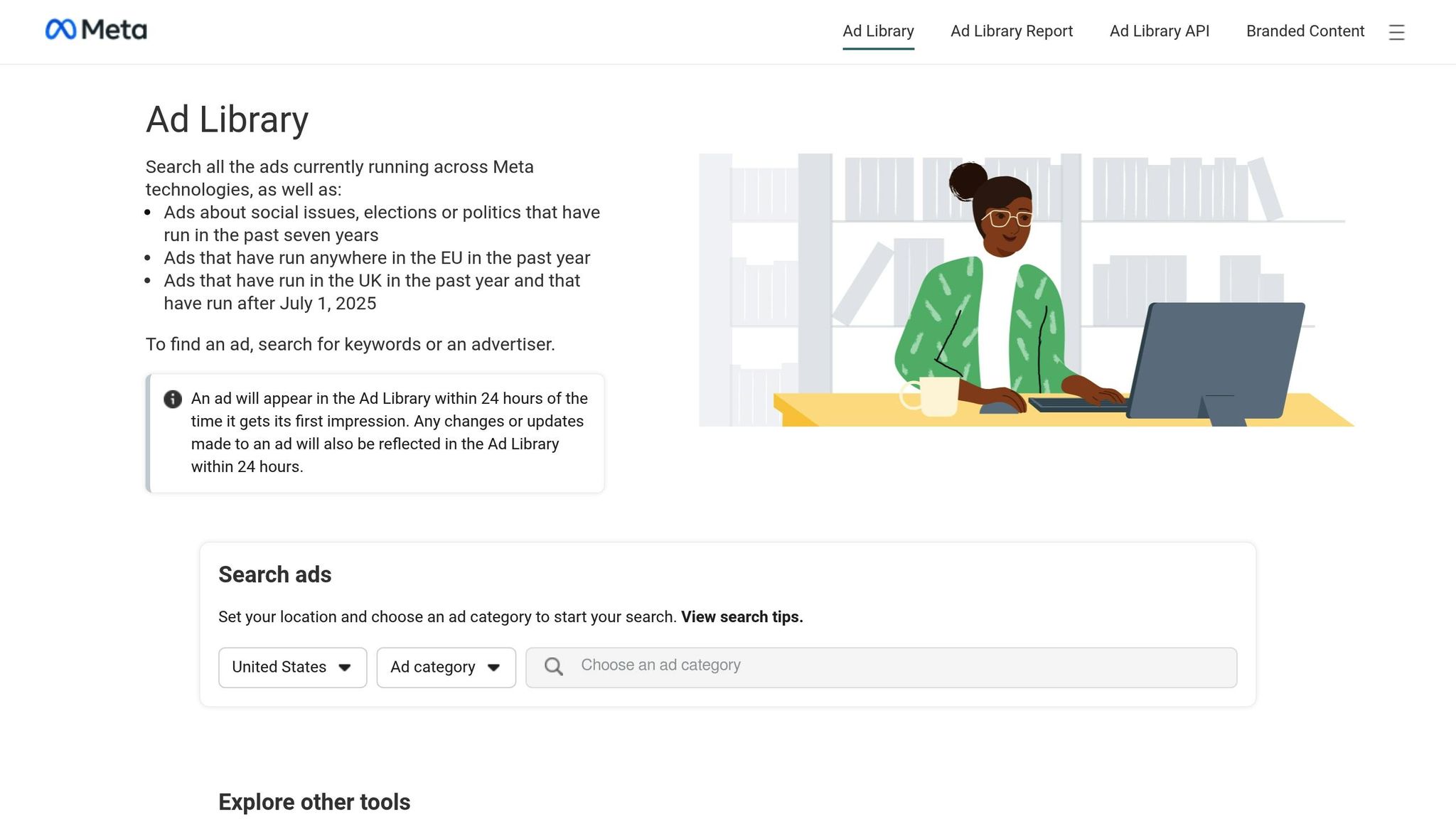
The Meta Ad Library is a free tool that lets you see all active ads running on Facebook, Instagram, Messenger, and the Audience Network. To begin, search by your competitor’s Page name or use industry keywords if they aren’t running ads currently. You can also filter the results to see which platforms they’re focusing on, whether it’s Instagram Stories or Facebook’s News Feed.
While the library doesn’t show exact targeting details, you can make educated guesses based on ad copy, visuals, and calls-to-action. For example, if an ad says something like "perfect for busy parents" or includes images of families, it’s likely aimed at parents.
Anna Sonnenberg from Social Media Examiner points out:
"The Meta Ad Library won’t reveal the exact audience targeting parameters your competitors are using for Instagram ads but seeing these details can help you understand the types of people they’re targeting."
Take note of how long an ad has been running. Ads active for weeks or months are often a sign of a winning combination of targeting and creative. As Alexandra Sheehan from Shopify explains:
"If a brand has run a particular ad for a long time, it may indicate this ad has proven particularly effective."
Clicking "See Ad Details" can also reveal multiple versions of an ad, showing what elements – like headlines, images, or CTAs – are being tested. Keep an eye out for the "Paid Partnership" label, which can help you identify influencers or partners your competitors are working with. Additionally, using filters to track seasonal campaigns, such as Valentine’s Day or Back-to-School promotions, can help you plan your own campaigns more effectively.
Use Meta Audience Targeting Tools
Meta Ads Manager also offers tools to help you research audience interests. Start by entering a competitor’s brand name in the "Detailed Targeting" section of the audience settings. If the brand appears as an "Interest", you’ll see an estimated audience size, giving you an idea of how many South African users are engaging with that competitor.
If you see a competitor’s ad in your personal feed, click the three dots and select "Why am I seeing this ad?" This feature reveals whether the ad is using interest-based targeting, lookalike audiences, or uploaded customer lists, as well as details about age ranges and locations. In regions like the EU and UK, additional public targeting information may be available due to regulatory requirements.
The "Page Likes" section can also help you uncover related interests or topics that overlap with your competitor’s audience. You’ll find demographic insights like age, gender, education levels, and job titles, along with details about device usage and recent audience activity, such as likes, comments, and shares over the past 30 days.
Use LinkedIn Campaign Manager
While Meta focuses on consumer behaviour, LinkedIn offers a unique advantage for understanding professional audiences, particularly in the B2B space.
LinkedIn Campaign Manager is a great tool for researching professional audiences. To access its targeting features, start the "Create Campaign" process. Enter your competitor’s company name under the "Company" attribute to estimate their employee base on LinkedIn.
You can refine this further by layering filters like "Job Function", "Seniority", or "Member Interests" to get a clearer picture of your competitor’s audience. The Forecasted Results Panel provides real-time estimates of audience size and demographic breakdowns, including industries and years of experience. As Trey Buchanan, Senior Manager, explains:
"With these campaigns, we can know exactly who this job title is that’s in front of this ad, and what company they’re at. And it makes our job of finding these people much easier."
With LinkedIn’s database of over 1.2 billion professionals globally, you can pinpoint audiences based on verified attributes like industry, job function, and seniority. This precision not only helps you better understand your competitors’ professional audience but also highlights gaps in your own strategy that you can address.
Create and Test Competitor-Based Audiences
It’s time to put all that competitor research to good use. By leveraging insights about your competitors, you can target and refine your audience with precision. While Facebook’s privacy rules mean you can’t directly copy a competitor’s follower list, you can use interest-based targeting and lookalike audiences to connect with similar users.
Build Lookalike and Interest-Based Audiences
To reach your competitor’s audience, head to the Detailed Targeting section in Meta Ads Manager. Here, you can enter your competitor’s brand name as an Interest. If the brand is popular enough, it will show up as a selectable option. This approach helps you target individuals who are already interested in the type of products or services you offer. As Viral Solutions highlights:
"You should target a competitor’s audience because these are people that already have an active interest in the product/service you’re offering."
Once you’ve attracted users through interest-based targeting, you can create a Custom Audience from their interactions. This Custom Audience acts as the "seed" for building a Lookalike Audience. To create a valid seed, you’ll need at least 100 people from the same country, though Facebook recommends 200 or more conversions for better accuracy. Keep in mind that Lookalike Audiences take 1 to 6 hours to generate and refresh every three days when actively used.
When setting up your Lookalike Audience, you can choose to optimise for Similarity (the top 1% of people most similar to your seed) or Greater Reach (5–10% for a broader match). Start with a 1% Lookalike for precision, then scale up to 3% or 5% as needed.
If your audience feels too broad, you can narrow it down using the "Define Further" button in Ads Manager. For example, you could target users interested in both a competitor brand and a niche influencer. Adding filters like age, gender, or location can further refine your audience. These steps set the stage for effective testing and optimisation.
Test and Improve Your Audiences
To fine-tune your targeting, run small campaigns with different audience segments and track key metrics like cost per lead, click-through rates, and engagement quality. Pay attention to interactions like comments and shares to ensure the engagement is meaningful, not superficial.
You can also use the "Why am I seeing this ad?" feature on competitor ads in your personal feed. This tool can help you reverse-engineer their targeting strategy, revealing whether they’re using interest-based targeting, lookalike audiences, or even uploaded customer lists.
Regularly compare your metrics to competitor benchmarks. If an audience isn’t performing well, adjust your targeting criteria or experiment with a different competitor interest. Social media trends shift quickly, so conducting monthly or quarterly audits can help you stay ahead. Following these steps ensures you’re prepared to evolve your approach or bring in expert assistance if needed.
Get Professional Help
Managing competitor-based audiences can be a time-intensive process. If you’re a South African business looking to save time and boost your ROI, Aion Marketing offers tailored solutions. Their team specialises in Meta Ads management, including audience research, lookalike audience creation, and campaign optimisation. They can handle the heavy lifting for you, monitor performance, and tweak targeting strategies in real-time, helping you stay aligned with competitor trends while you focus on growing your business.
Track Competitor Audiences Over Time
Keeping an eye on competitor audiences isn’t a one-and-done task; it’s an ongoing process. Regular monitoring ensures your insights stay relevant. After all, 85% of companies rely on social data for insights, and staying updated is key to staying competitive.
Think about it: a competitor that seemed irrelevant just three months ago could now be making waves with the audience you’re trying to reach. As strategist Kenichi Ohmae famously said:
"Without competitors, there would be no need for strategy".
Schedule Regular Reviews
Once you’ve done your initial competitor analysis, the real work begins – keeping those insights fresh. Make it a habit to review competitor activity regularly. Check their engagement levels, follower growth, and ad campaigns every month. Facebook’s "Pages to Watch" feature in the admin panel is a handy tool for tracking weekly "Like" growth and spotting sudden spikes in activity.
Every quarter, go deeper. Conduct a thorough audit, and use the findings to update your saved audiences in Meta Ads Manager. For instance, if a competitor shifts their content strategy or starts targeting a new demographic, your interest-based audiences should reflect that. At the same time, revisit your key performance indicators (KPIs) monthly to ensure you’re focusing on the metrics that align with your brand’s goals.
Watch for Changes in Competitor Strategy
Keep an eye out for subtle but telling shifts in your competitors’ strategies. Are they leaning more into short-form video content? Did they update their profile bio or tweak their call-to-action links? These small adjustments can hint at larger strategic changes.
Also, watch how they balance paid promotions versus organic posts. Changes here can reveal shifts in budget priorities or marketing focus. For South African businesses, geographic targeting is especially worth tracking. If a competitor starts focusing on specific provinces or cities, it might mean they’ve spotted a profitable local market. Similarly, pay attention to changes in their messaging tone or language – these can reflect new audience insights or evolving customer preferences.
Conclusion
Targeting your competitors’ audiences effectively requires a well-thought-out plan. Begin by examining your own audience’s demographics and performance data. From there, identify your direct and indirect competitors, analyse their content strategies and engagement patterns, and leverage tools like Meta Ad Library and LinkedIn Campaign Manager to uncover their targeting methods. Use this information to create lookalike and interest-based audiences, test them regularly, and keep an eye on competitor activity to stay ahead of any shifts in tactics or new opportunities.
The key to success lies in consistent analysis and testing. Markets are constantly changing, audiences evolve, and competitors adjust their strategies. Regular monitoring ensures you don’t waste your budget on outdated methods. Interestingly, 85% of companies use social data as a primary source of business insights. This highlights the importance of refining your approach to turn campaigns into measurable successes. As Pinterest Marketing Expert Meagan Williamson explains:
"When your competitors have impressive metrics, it’s essential to understand what they are doing well to build a better social media strategy. Also, their weaknesses… can be opportunities for your brand growth." – Meagan Williamson, Pinterest Marketing Expert
For South African businesses aiming to boost their social media ROI, a data-driven approach is critical. Companies like Aion Marketing provide comprehensive competitor audits, actionable insights, and ongoing monitoring. Their services help identify content gaps, fine-tune paid campaigns, and benchmark your performance against industry leaders. By focusing on real audience behaviours and verified competitor insights, they deliver strategies designed for sustainable growth.
FAQs
How do I identify my competitors’ audiences on social media?
To connect with your competitors’ audiences on social media, start by pinpointing your market niche and listing your key competitors. Dive into their profiles on platforms like Facebook, Instagram, and LinkedIn. Look closely at who follows them, how they engage, and the hashtags they frequently use. Analysing comments and shared posts can also give you a clearer picture of their audience.
For deeper insights, consider using specialised tools to gather audience data. Focus on uncovering shared interests, age groups, locations, and behaviours that match your business objectives. This understanding can guide you in fine-tuning your strategy and crafting content that appeals directly to these groups.
What are the best ways to analyse competitor audiences on social media?
To get a sense of which audiences your competitors are connecting with on platforms like Facebook, Instagram, and LinkedIn, you can rely on tools designed to analyse demographics, interests, and engagement trends. These insights can reveal untapped potential and help sharpen your targeting efforts.
Here are a few tools worth exploring:
- Hootsuite: Tracks audience demographics, follower growth, and how competitor content is performing.
- Facebook Audience Insights: Breaks down user data such as age, gender, location, and interests for people engaging with competitor pages.
- Sprout Social: Features a competitor dashboard to keep an eye on audience size, engagement levels, and recurring content themes.
At Aion Marketing, we specialise in using these tools to uncover actionable insights tailored to the South African market. Our team takes this data and turns it into campaigns that connect with your audience, helping you boost your ROI and expand your online presence.
How can I create lookalike audiences using competitor data on social media?
To create a lookalike audience using competitor data, start by crafting a custom audience. You can do this by focusing on your competitor’s followers or analysing engagement data from their social media pages. Once your custom audience is set up, head over to Meta Ads Manager and use it as the foundation for your lookalike audience.
From there, select a similarity range between 1% and 10% – 1% represents the closest match to your source audience. Then, set South Africa as your target region. Meta Ads Manager will take it from here, generating a lookalike audience that shares key traits with the audience you provided. This allows you to connect with individuals who are more likely to resonate with your brand.
This approach is an effective way to broaden your reach and attract potential customers who align with your competitor’s audience.


